Quick Answer
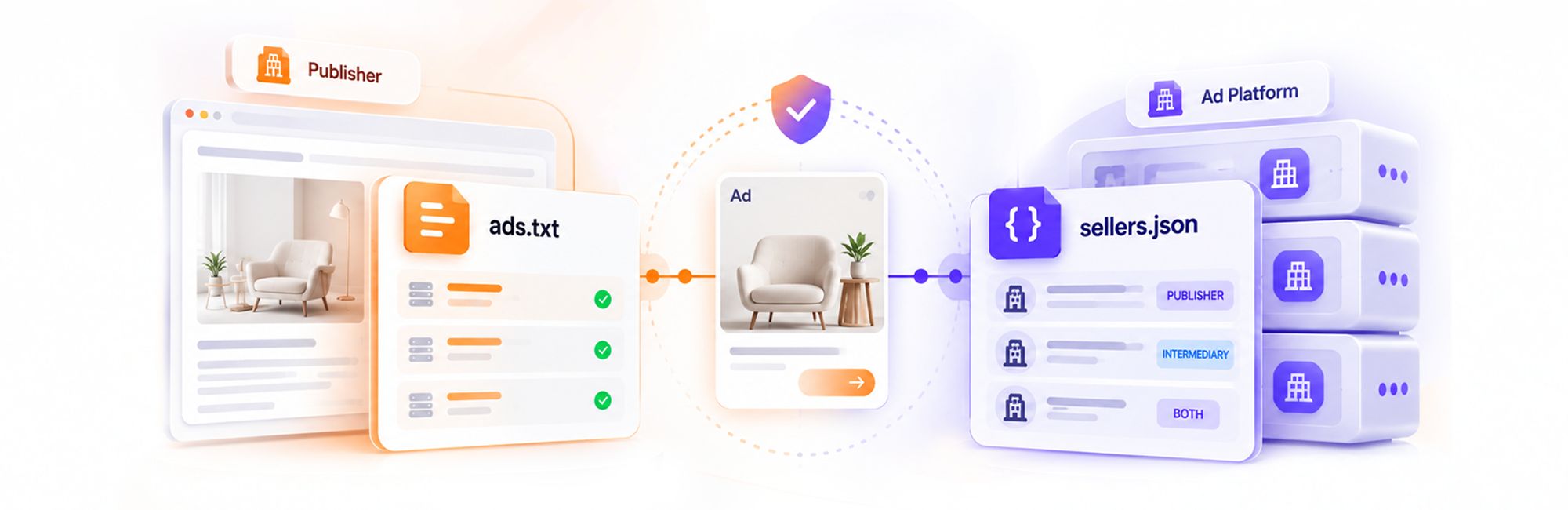
Ads.txt is a file a publisher posts on its own website to list the platforms and accounts allowed to sell its ad inventory, and sellers.json is a file an ad platform, such as an SSP or an exchange, publishes to show who is behind each seller ID on that platform. Ads.txt declares who is allowed to sell, and sellers.json discloses who that seller is. Buyers compare the two, along with the SupplyChain object in the bid request, to confirm that the seller and the supply path match.

What does ads.txt actually say?
Ads.txt exists to stop one problem: someone selling ad inventory that isn’t theirs. The IAB Tech Lab launched it in 2017, and an early test in the first quarter of 2018 showed why. The Guardian, Google, and MightyHive bought inventory that claimed to be the Guardian’s, with and without ads.txt filters. Without the filters, 1 percent of display ad spend and 72 percent of video ad spend went to unauthorized programmatic platforms. With the filters, the Guardian found no discrepancies between what was bought and what it received. It was one test, so it shows what the file was built to prevent, not how often it happens.
What one line contains and where the file lives
The file sits at the root of the publisher’s domain, at an address like publisher.com/ads.txt, and anyone can open it. Platforms read it automatically. Each line names one seller, and it looks like this, using invented names:
northbridge-exchange.example, 48213, DIRECT
That line carries three things: the domain of the ad platform, the publisher’s account ID on that platform, and a label for the relationship. An optional fourth field can point to a certification authority, but the first three do most of the work in a typical check.
What DIRECT and RESELLER mean
DIRECT means the publisher, as the owner of the content, directly controls the account named on that line. RESELLER means the publisher has authorized another company to control that account. Managed setups blur the line. A company that runs monetization for a publisher isn’t the publisher, but it can still be the closest path to the inventory, and two labels can’t express that.
Version 1.1 of ads.txt, finalized in 2022, added variables for this kind of context. OWNERDOMAIN is the business domain of the company that owns the site or app, and it should match the domain on the publisher’s own entries in sellers.json. MANAGERDOMAIN is the business domain of a primary or exclusive monetization partner. It is optional, meant for cases where a partner manages the publisher’s inventory, and a publisher can name one manager per country. Neither replaces DIRECT and RESELLER. They add context those labels can’t carry, and whether a buyer acts on that context is the buyer’s call.
What does sellers.json actually say?
Sellers.json is the other half of the check. An ad platform, whether an SSP or an exchange, publishes it on its own domain and lists the sellers that use that platform. Publishers don’t host it. The IAB Tech Lab introduced it in 2019, a couple of years after ads.txt.
Each entry has a seller ID and a seller type, plus a name and domain in most cases. PUBLISHER means the inventory sold through the account sits on a site, app, or other medium owned by the named company, which the platform pays directly. INTERMEDIARY means the named company doesn’t own the inventory it sells, or the platform doesn’t pay it directly. BOTH means the seller handles both kinds. The seller ID is the same one that appears as the account ID in ads.txt and as the sid in the SupplyChain object, and that shared ID is what lets a buyer connect the files.
That connection matters because ads.txt on its own only says that account 48213 on Northbridge Exchange may sell this publisher’s inventory. It doesn’t say whose account that is. Sellers.json answers that.
A seller can also be marked confidential, in which case the name and domain may be left out. A buyer who can’t see who is behind a seller ID has less to go on, and some buyers choose to skip those sellers.

How do ads.txt and sellers.json work together?
Think of them as three different questions. Ads.txt answers who is allowed to sell. Sellers.json answers who is behind a seller ID and what role that seller plays. The SupplyChain object answers which parties handled this particular request. None of them settles alone whether a seller can be trusted, which is why buyers compare them.
A worked example
Take an invented news site called Harbor Daily. A bid request arrives saying the ad slot is on harbordaily.example and the seller is account 48213 on Northbridge Exchange. A buyer’s platform starts with the publisher’s file at harbordaily.example/ads.txt and looks for a line naming Northbridge Exchange and account 48213. It finds northbridge-exchange.example, 48213, DIRECT, so the publisher is saying that account is its own.
Then the platform opens Northbridge Exchange’s sellers.json and looks up seller ID 48213. The entry says the name is Harbor Daily Media, the domain is harbordaily.example, and the type is PUBLISHER. The ads.txt line says DIRECT, the seller is listed as a publisher, and the domain points back to Harbor Daily. The two files agree.
In practice nobody opens files by hand in the middle of an auction. Platforms collect these files ahead of time and check incoming requests against what they have stored.
Where the SupplyChain object comes in
A single ad can pass through more than one platform before it reaches a buyer. The SupplyChain object is a field inside the bid request that can list the parties involved, one entry for each, identified by the ad platform’s domain (the asi field) and a seller ID (the sid field). A buyer can take each entry and look it up in that platform’s sellers.json. In the Harbor Daily example, an entry for northbridge-exchange.example with seller ID 48213 is the same pair the buyer already found in the two files.
Ads.txt and sellers.json describe relationships in general. The SupplyChain object describes this one request. So the three work as permission, identity, and path, and the strongest check is the one that compares all three.
What happens when ads.txt and sellers.json don’t match?
A match looks like the Harbor Daily example. A mismatch is when the two files, or the request itself, don’t line up. A common consistency check compares them using pairings like these:

These pairings are starting points, not rules. They come from common validation practice, and the sellers.json specification itself doesn’t require them. BOTH needs a closer look, because it can mean a company owns some inventory and represents other inventory. Managed setups can also be valid without fitting the pairs neatly, so a pairing that looks off calls for a closer look, not a verdict.
Common mismatches include a DIRECT line for an account that sellers.json lists as an intermediary, or a RESELLER line for an account listed as a publisher. A seller ID in ads.txt that doesn’t appear in the platform’s sellers.json at all is another. So is a PUBLISHER entry whose domain doesn’t match the OWNERDOMAIN in the publisher’s own file, and a SupplyChain entry a buyer can’t find in the matching sellers.json.
A mismatch is not proof of fraud. Most have ordinary causes. A publisher stopped working with a partner and never removed the line. A platform closed an account and dropped it from its file. Someone made a typo in an ID. A publisher may also legitimately hold more than one account with the same platform. These are housekeeping problems, and they still matter because they leave a buyer unsure.
A buyer who spots one can check the publisher’s ads.txt again in case it has changed, see whether OWNERDOMAIN or MANAGERDOMAIN explains a managed setup, and confirm the seller ID with the platform. Some buyers skip the path until it’s explained, so a publisher who hears about a mismatch should ask the platform how the account is listed, then fix or remove the line if it’s out of date.
What changes for mobile apps and CTV?
Apps and connected TV follow the same logic, with one difference in where the publisher’s file sits. A website has its own domain, so ads.txt lives there. An app isn’t a website, so the IAB Tech Lab created app-ads.txt, an extension of ads.txt for apps distributed through mobile app stores and connected TV app stores. The developer publishes the file on their own website, and buyers typically find that website through the app’s store listing.
The lines look the same and use the same DIRECT and RESELLER labels. Sellers.json doesn’t change, because the platforms still publish it, and the SupplyChain object can be included in the bid request for app inventory. The longer the path between a buyer and the app, the more entries there are to check.
Xapads states that its supply is compliant with both ads.txt and app-ads.txt and runs on a single-hop path. Fewer steps between a campaign and the inventory means fewer entries to check, and a buyer can test the claim the same way as any other, by reading the published files.
For advertisers buying app inventory, Xerxes, the mobile performance DSP from Xapads, connects to more than 25,000 mobile apps and 50 or more SSPs. That many sources means a lot of app-ads.txt and sellers.json files, so knowing how they fit together matters more as the count grows.
What can’t ads.txt and sellers.json tell a buyer?
These files answer questions about permission and identity. They leave a lot of what a buyer cares about untouched.
Fraud is the biggest gap. Ads.txt was built to stop unauthorized selling and spoofed inventory, and it helped in that 2018 test, but bot traffic, invalid clicks, and other kinds of fraud sit outside what the files describe. They can reduce certain supply-chain risks. They aren’t a complete fraud detection system.
Where an ad appears and how it performs is another gap. A properly authorized seller can still place an ad in a poor environment or in a spot nobody sees. Brand safety, viewability, and traffic quality each need their own checks.
Upkeep matters more than most people expect. A stale line, a missing seller ID, or a platform that lets its file drift out of date weakens the whole picture. And nothing in the standards forces a publisher or a platform to use them. How strictly a buyer enforces them is the buyer’s own decision, so their value depends on someone actually checking. Confidential entries add one more limit, since they hide who is behind a seller ID.
What should publishers and advertisers do with this?
For publishers
Keep ads.txt, and app-ads.txt for apps, current, and remove partners the publisher no longer works with. Publishers don’t host sellers.json, but they can look up their own account in each platform’s file and confirm the name, domain, and type are right. Label DIRECT and RESELLER carefully. Add OWNERDOMAIN, and add MANAGERDOMAIN where a primary or exclusive partner manages monetization. For apps, make sure the developer website listed in the store is the one hosting app-ads.txt.
For advertisers
Check that the platforms in a supply path publish a sellers.json file and that the seller IDs in ads.txt show up in it. Read the SupplyChain data where it’s passed along, and treat any entry that can’t be matched as something to look into. Use what the files show when comparing paths, next to cost and quality. A path that checks out cleanly isn’t automatically the best one, and a longer path isn’t automatically a bad one.
Ads.txt says who can sell, sellers.json says who that is, the SupplyChain object shows who handled the request, and the real value comes from checking all three against each other.
Frequently Asked Questions
Is ads.txt the same as sellers.json?
No. Ads.txt is published by a publisher and lists who may sell its inventory. Sellers.json is published by an ad platform and identifies the sellers on that platform. They are meant to be used together.
Who publishes each file, and does a publisher need its own sellers.json?
Publishers publish ads.txt on their own domain. SSPs, exchanges, and other ad platforms publish sellers.json on theirs. A publisher doesn’t need to create a sellers.json file, but it’s worth checking how the platform lists its account.
What do DIRECT and RESELLER mean in ads.txt?
DIRECT means the publisher directly controls the account named on the line. RESELLER means the publisher has authorized another company to control that account. Version 1.1 added OWNERDOMAIN and MANAGERDOMAIN to give more context for managed setups.
Why should buyers check sellers.json as well as ads.txt?
Ads.txt only says an account is authorized to sell. It doesn’t say whose account it is. Sellers.json fills that gap by identifying the company behind the seller ID and whether it is a publisher or an intermediary.
What happens if ads.txt and sellers.json don’t match?
It’s a flag, not proof of fraud. Common causes are outdated lines, removed accounts, typos, and setups the labels don’t describe well. Some buyers will skip a path until it’s explained, so publishers gain by fixing mismatches quickly.
Can ads.txt and sellers.json prevent ad fraud?
They can reduce certain risks, mainly unauthorized selling and spoofed inventory. They don’t detect bot traffic or other kinds of invalid activity, so they work alongside fraud detection rather than replacing it.
What is app-ads.txt?
App-ads.txt is the version of ads.txt for apps, including mobile and connected TV apps. It serves the same authorization purpose as ads.txt, but for app inventory. The developer hosts it on their own website, and buyers typically find it through the app’s store listing.
Further Reading
Readers who want to see how a clean supply path connects to campaign results can start with why many programmatic campaigns underperform and what advertisers can do about it.
Related Post